Many of my readers in the humanities already know about Zotero, the free open-source citation manager that works within Firefox and scares the hell out of Endnote’s makers. If you are a student or professor and haven’t tried Zotero, then you are missing out on an essential tool. I use it daily, both for my research and in my teaching. [Full disclosure: I am not an entirely impartial evangelist for Zotero, as its developers are colleagues at George Mason University, in the incomparable Center for History and New Media.]
The latest version of Zotero allows you to “publish” your library, so that anybody can see your collection of sources (and your notes about those sources, if you choose). In my case, I’ve not only published my library on the zotero.org site, I’ve updated the main sidebar on this very blog with a news feed of my “Recently Zoteroed” books and articles. As I gather and annotate sources for my teaching and research, the newest additions will always appear here, with links back to the full bibliographic information in the online version of my library.
How did I do this?
Why did I do this?
What follows is an attempt to answer these two questions. Before I address the how-to, though, I’ll explain the why-to: why I’m making the sources I use for my teaching and research public in the first place.
Sharing my Library in theory
Like many scholars in the humanities (I imagine), I initially had qualms about sharing my library online — checking that little box in my Zotero privacy settings that would “make all items in your library viewable by anyone.” Emphasizing the gravity of the decision, zotero.org adds this warning: “Be very sure you want to do this.”
I do want to do this, I do, I do.
But why? We are accustomed, in the humanities, to being very secretive about our research. Oh sure, we go to conferences and share not-yet-published work. But these conference papers, even if they’re finished the morning of the presentation with penciled-in edits, they’re still addressed to an audience, meant to be shared. But imagine publishing your research notes and only the notes, shorn of context or rhetoric or (especially or) the sense of a conclusion we like to build into our papers. Imagine sharing only your Works Cited. Or, imagine sharing the loosest, most chaotic collection of sources, expanded way beyond the shallows of Works Cited, past the nebulous Works Consulted, deep into the fathomless Works Out There.
Or, to switch metaphors, sharing our sources in advance of the final product is like sharing the blueprints to a house we haven’t yet built — a house we may not even have the money to build, and meanwhile you just know there’s somebody out there, more clever or less scrupulous or just damn faster, who can take those blueprints and erect an edifice that should have been ours while we’re still at town hall getting zoning permits. We’ve all had that experience of reading a journal article or — damn it! — a mother effing blog in which the author tackles clearly, succinctly and without pause some deep research concern that we’ve been pondering for years, waiting for it to blossom into a Beautiful Idea in our writing before going public with it. And POOF! somebody else says it first, and says it better.
Keeping our sources private is the talisman against such deadly blows to our research, akin to some superstitious taboo against revealing first names. We academics are true believers in occult knowledge.
To put it in the starkest terms possible: before I published my library I was concerned that someone might take a look at my sources and somehow reverse engineer my research.
Looked at prosaically, public Zotero libraries may be the equivalent of a give-a-penny, take-a-penny bowl at a local store. This convenience alone would be useful, but the creators of Zotero are much more inspired than that. They know that sharing a library is crowdsourcing a library. The more people who know what we’re researching before we’re done with the research, the better. Better for the researchers, better for the research. Collaboration begins at the source, literally. And as more researchers share their libraries, we’re going to achieve what the visionaries in the Center for History and New Media call the Zotero Commons, a collective, networked repository of shareable, annotatable material that will facilitate collaboration and the discovery of hidden connections across disciplines, fields, genres, and periods.
And that is why I’m sharing my library.
Sharing my Library in Practice
Now, how am I sharing it? I’ve taken what seems to be an unnecessarily complicated route in order to incorporate my library into my blog. There is an easy way to do what I’ve done: Zotero has native RSS feeds for users’ collections, and all you need is to subscribe to that feed using a widget on your blog. In my case I could have used the default WordPress RSS sidebar widget. But I didn’t. I wound up working with both Dapper and Yahoo Pipes, and here’s why.
I didn’t like how the RSS feed built into zotero.org included everything I added, including duplicate citations, snapshots that I later categorized as something else, and PDFs unattached to metadata (even if I retrieved that metadata later). In short, the default RSS stream looked messy in WordPress (but it looks great in Google Reader). [UPDATE: Patrick Murray-John’s awesome Zotero WordPress plugin solves these problems and makes the Pipes solution below unnecessary—though still cool.]
The online mash-up tool Yahoo Pipes is perfect for combining and filtering RSS feeds and that’s what I wanted to use. I can’t program my way out of a paper bag, but Pipes is simple enough that even I can use it. So why did I also use Dapper, another online tool that lets you do fun things with RSS feeds? Because Pipes for some reason would not accept the Zotero RSS feed as valid. I haven’t been able to confirm this, but I’m guessing it has something to do with Zotero’s API using a secure HTTPS rather than HTTP. Or maybe it’s because the Zotero feed is actually XML rather than RSS. Again, I’m not a programmer and I’m just fumbling my way around this hack. In any case I ran my Zotero feed through the Dapp Factory, which did accept it.
Next I dumped the Dapper feed into Yahoo Pipes, using several of Pipe’s operators to filter duplicates and attachment file names that were cluttering the RSS feed. Here’s is a map of my Pipe.
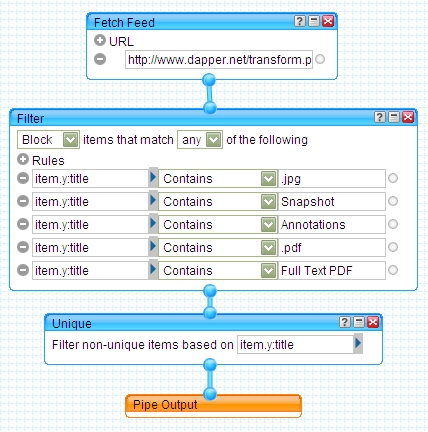
It’s quite simple, and with some experimentation I may improve my hack (for example, I’m toying with Feedburner as a substitute for Dapper, which may preserve more of the original XML, giving Pipes more raw data to manipulate and mash). But even right now in its kludged form, the result is exactly what I set out to do.
In addition to its simplicity, one of the advantages of Yahoo Pipes is the variety of output formats available. For my blog’s sidebar I have Pipes generate an RSS feed, but I could just as easily create an interactive Flash “badge” with it:
I find the possibilities of a portable, embeddable version of my Zotero library extremely evocative. It’s a kind of artifact from the future that our methodological and pedagogical approaches haven’t caught up with yet. Here is where the theory and practice of a collaborative library have yet to meet — and I want to end my manifesto/guide with a simple appeal: let’s begin thinking about the untapped power of this intersection and what we can do with it, for ourselves, our students, and our scholarship.
What beautiful irony. The first couple links I clicked in your sample feed went to a paywall that stopped me from accessing the articles without a JHU ID number.
Thanks for the walk-through. I’ve had trouble with directly feeding the RSS from Zotero into my WordPress.com blog, but your comment about it being XML makes some sense. I’ll give this Yahoo Pipes work-around a shot. Thanks again!
[…] http://www.samplereality.com/2009/07/29/on-hacking-and-unpacking-my-zotero-library/ […]
Great post Marc. I love how this asserts a whole different way of being in the scholarly community. I’m going to give Zotero a try.
It’s good to see people from the humanities eager about new technologies. Thanks for the entertaining read, and here’s to hoping syndication technologies like this results in positive pedagogical shifts and a more open stance towards knowledge.
[…] a topic on the chance that we’ll get scooped. Which is why Mark Sample’s recent post on sharing his Zotero library feels so revolutionary (or is that common sensical?). He not only explains why he’s doing […]
[…] Prof Hacker and Sample Reality, and another interesting post by Mark Sample at Sample Reality about sharing research sources via Zotero. I have begun using Zotero, but, frankly, I still don’t quite understand it. It […]
Thanks for sharing this. I just tried to do the same thing and have been able to create my own zotero feed. Unfortunately, the filter does not seem to be working as your has and I am still getting .pdfs and duplicates. Ill keep plugging away and see what I can come up with. Thanks, again!
[…] not share it publicly. I’m all for the sharing of Zotero libraries, including notes (see this post by Mark Sample for a thoughtful reflection on why this is a good idea), but I’ve not yet […]
[…] there’s a long history of researchers treating their work as proprietary. There are entirely rational reasons for this that have to do with the rewards structure of the […]
Hi Mark and everyone else in this thread. I thought you all might be interested in my take on this, using Drupal: http://www.zachwhalen.net/blog/09/aug/recently-zoteroed-drupal-approach
I don’t mean to suggest that using Pipes is a bad idea; it’s just that what you’re using it for presented a good opportunity for me to demonstrate some similar functionality just using Drupal and its all-powerful Views module.
Zach, very cool! I’m going to have to get down and dirty with Drupal at some point in the near future. In the meantime, I think I’m going to subscribe to your Zotero feed!
I am thrilled by the possibility of sharing libraries and citations online– while someone can’t reverse engineer your research isn’t it great to have ALL your background reading there informing people who read your work, are interested in the topic, etc?
I’d love to make my Zotero library part of my own website, not as a feed but as a dynamic interface. I know that this isn’t impossible, but it does seem like it’s going to require a bit more work and getting down and dirty with some code… Any tips would be very much appreciated!
[…] not share it publicly. I#8217;m all for the sharing of Zotero libraries, including notes (see this post by Mark Sample for a thoughtful reflection on why this is a good idea), but I#8217;ve not yet […]
[…] not share it publicly. I’m all for the sharing of Zotero libraries, including notes (see this post by Mark Sample for a thoughtful reflection on why this is a good idea), but I’ve not yet […]
I think the Manhattan Project is as a metapher the wrong approach to describe reasons of secrecy in the field of science. I suggest to look at secrecy in science from a perspective of economy. Either, if you are a scientist or a scientific institute, it’s about being better than the competition to attract public or private funding. The question here naturally is what the criterias of the funder look like. And yes, maybe you become better throughout crowdsouring. But, who knows?. Or else, the knowledge work happens in the context of contract research with the aim of acquiring competitive advantages. How to involve the crowd in the process of innovation if you are bound to a non disclosure agreement? In both cases, Mancur Olson’s theory of collective action might fit. Acquired knowledge can only be made available as a collective good, if its author’s profit does not decrease because of making it available. The thing is: How to be sure that there will be a benefit of sharing throughout the effect of crowdsourcing on the one hand, if you risk to give away competitive advantages on the other hand? This question occurs as soon as things get connected to money. As a result, prudence requires restraint. Sharing and crowdsourcing are ideas I appreciate a lot. I see the hope on crowdsourcing as a strong argument for publishing my whole library. But I’m prudent too. Therefore, to me, it seems to make more sense to split my work between my private library and to share parts of it consciously in more or less public group libraries. In any respect, Zotero is great. Its success may also be related to the freedom of choice if and what you like to share.
[…] I began to work with Zotero a few days ago, I found an article by Marc Sample about how and why he wants to share his library of citations and notes online. Sample, a professor […]
[…] time ago, Zotero opened up the option for users to share their libraries. Mark Sample has, many months past, deftly explained the reasons some scholars are hesitant to share their […]
@shermandorn @wcaleb Way back I advocated sharing sources and notes through Zotero, but I like the wiki idea too. http://t.co/qpWQs1AlNB
“Are we in the humanities really that ridiculous and self-important?” On Sharing Your @Zotero Library http://t.co/RVVJdQirnE